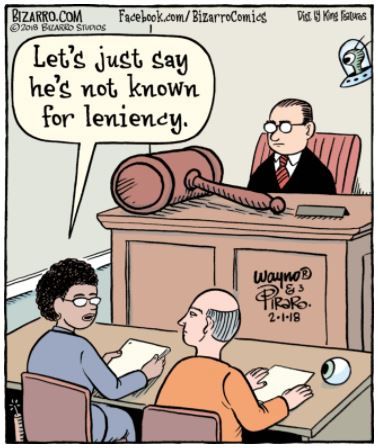
It’s funny, but they passed up the obvious pun of buttman.
There is a bug in the Arlo page: after one clicks on the link to go there, the link attached to the CIDU logo retains “arlopage” in the URL, which means there’s no easy way to get back here.
CaroZ: Unfortunately, with the new page, the links are the same color as the rest of the text, so it’s hard to notice that when Bill wrote “Arlo Page!” it was a link.
Okay, until/unless I find a way to make links show up more distinctly, I’ll use “CLICK HERE” as a link test. Annoying, but not worth jettisoning a template over.
The link works for everybody, though?
The link works, but it’s unidirectional, since the Arlo page considers itself as its own “home”. (“No, Dorothy, you cannot get back to Kansas from over there.“)
P.S. The link issue isn’t worth ditching this template, but there are plenty of other details that I dislike about this template, mostly related to lots of wasted real estate (white space and/or linking features that I never use and would rather not have to scroll over, especially not on my phone). Another (minor) benefit of the previous (“flexible”) template was that it was left justifed (anchored to the left edge of the screen), instead of this maddening fixation on “centering” the (fixed width) frame within the available window width. As far as I’m concerned, changing to this one was a step backward.
Okay, I’m searching to get used to the Wayno art style for Bizarro.
×starting
Or maybe auto correct does know better, and it requires some effort, like a search…
Working now?
You all know about the “back button” in your browser, don’t you?
It’s not that the link to the Arlo Page is unidirectional, but that it opens a new page: just close the Arlo Page and CIDU should still be there.
Honestly, I wish I could figure out a way to re-use the old template, but I think they’ve retired it. And unfortunately, the trend seems to be MASSIVE amounts of wasted white space, to the extent that the comics can be almost unreadable.
Trade-offs: the automatic centering seems to be related to the automatic resizing that prevents the last panel of a large strip from being cut off. And probably why the site seems to work on everybody’s cell phone.
I don’t suppose it’s possible to edit the templates? Fixing whether links are marked by default should be a one-liner.
Dave, they don’t allow any changes in how the sausage is made. I was surprised they allowed me to swap out Grasshopper Green for red.
Figures.
It appears that CIDU Bill is right, in essence, in terms of
editing the CIDU site’s templates.
I did some searching. Apparently, one *can* modify WordPress
templates in minor, and even major ways… if one has enough
geek skills. It doesn’t look like something a non-techie should
even think too hard about.
I’m glad the site is back and working well enough. I’m not going
to ask for the impossible (or even the improbable) from Bill.
I never did turn off that hijack page… Just sayin’.
Actually, let me do it this way:
Bill: if you can insert html into the page, put these following lines in (basically anywhere):
This will over-ride the style sheets, and make all links inside comments and entries grey; you can change the color if you want by replacing the word “grey” to the new color.
crap; of course it swallowed the html!
take two:
put these lines in:
Argh! I’d removed that media=”screen” line, but forgot to do so when reposting. *sigh*
So, the definitive:
<style type=”text/css”>
.comment-content a:link{color:grey !important}
.entry-content a:link{color:grey !important}
</style>
I never did turn off that hijack page… Just sayin’.
And I’m glad. I’ve been using it every day. Thank you.
Where exactly, larK? I don’t have access to any actual code.
Also, should probably get around to putting the “Recent Comments” code back into my sidebar here.
As to the page being back – I actually had a problem tonight unless it because the page was being updated or something – I came to the page, the title was there, the left hand bar was there, but I was told there was nothing here and to click on one of the links below – and there were none. I refreshed the page a few times and the rest appeared.
Now, as to the comics –
I know for a fact that the “Civil War reenactors” are not at a Federal park. How? No one is allowed to fall down at a battle reenactment at same as they are concerned that if someone was actually injured they would not know. They have a lot of “picky” rules – most of which are actually very good ones – for safety – all guns have to be inspected by and “pinged” in front of a certified inspector. (Pinging is dropping the ramrod down the bowl and if it does not hit the bottom and “ping” it means there is something in the barrel and it cannot be fired at the event.) No,2 lines of men pointing guns at each other. (Guns are normally elevated at reenactment battles – pointed up and over the heads of the other side,but that is not enough for Federal parks.) Most reenactment battles are held near the actual Federal park as a result.
When they did the 225th anniversary Battle of Yorktown we had to pack the cartridges into plastic in groups of 10 cartridges, label the bags and put them in one of the metal cartridge boxes we normally use, also labeled with the unit info and then National Parks collected all the boxes and doled out the cartridges to the unit as needed for each battle or event and returned the rest at the end of the event – we still find a bag of them every now mixed into the new cartridges. The camps were on the Yorktown Historic Park site,but the battles were at Endview Plantation (a Civil War site) nearby and everyone was bused over. (We missed it due to illness.)
Back to the cartoon in question – He’s the “banging” judge. See what I did there. I am sometimes clever, but always insecure.
Bill: so I’m confused — if you can put in the recent comments code, then you can put the style definitions I outlined in there too. I mean, when you say “putting the “Recent Comments” code back”, how are you doing it? Putting in a <a href=””> tag, or is this through some form or something? Cause if you are putting a raw html anchor tag in anywhere, you can put the style definitions in there, too.
larK, you can’t possibly be more confused than I am.
I know I can put the “recent comments” HTML in the sidebar widget. Are you saying I can put the other code in the sidebar as well?
The only two places I can insert code is in a sidebar widget or within a specific post or comment. The template itself, which I assume is where the other code would go, is read-only to me.
hmm… So the sidebar is a widget, which probably means it gets called in from the main page, so the style definitions in there probably wouldn’t apply… You can try it anyway, and see, but I see your point. Frustrating. Any code you put in posts would be sanitized, so the style sheet definitions wouldn’t work.


 Comics I Don't Understand
I am… not seeing anything “Arlo” (literal or otherwise) in any of these comics. Clearly there is an AIDU.
That’s because you didn’t follow the link to
https://arlopage.wordpress.com/
It’s funny, but they passed up the obvious pun of buttman.
There is a bug in the Arlo page: after one clicks on the link to go there, the link attached to the CIDU logo retains “arlopage” in the URL, which means there’s no easy way to get back here.
CaroZ: Unfortunately, with the new page, the links are the same color as the rest of the text, so it’s hard to notice that when Bill wrote “Arlo Page!” it was a link.
Okay, until/unless I find a way to make links show up more distinctly, I’ll use “CLICK HERE” as a link test. Annoying, but not worth jettisoning a template over.
The link works for everybody, though?
The link works, but it’s unidirectional, since the Arlo page considers itself as its own “home”. (“No, Dorothy, you cannot get back to Kansas from over there.“)
P.S. The link issue isn’t worth ditching this template, but there are plenty of other details that I dislike about this template, mostly related to lots of wasted real estate (white space and/or linking features that I never use and would rather not have to scroll over, especially not on my phone). Another (minor) benefit of the previous (“flexible”) template was that it was left justifed (anchored to the left edge of the screen), instead of this maddening fixation on “centering” the (fixed width) frame within the available window width. As far as I’m concerned, changing to this one was a step backward.
Okay, I’m searching to get used to the Wayno art style for Bizarro.
×starting
Or maybe auto correct does know better, and it requires some effort, like a search…
Working now?
You all know about the “back button” in your browser, don’t you?
It’s not that the link to the Arlo Page is unidirectional, but that it opens a new page: just close the Arlo Page and CIDU should still be there.
Honestly, I wish I could figure out a way to re-use the old template, but I think they’ve retired it. And unfortunately, the trend seems to be MASSIVE amounts of wasted white space, to the extent that the comics can be almost unreadable.
Trade-offs: the automatic centering seems to be related to the automatic resizing that prevents the last panel of a large strip from being cut off. And probably why the site seems to work on everybody’s cell phone.
I don’t suppose it’s possible to edit the templates? Fixing whether links are marked by default should be a one-liner.
Dave, they don’t allow any changes in how the sausage is made. I was surprised they allowed me to swap out Grasshopper Green for red.
Figures.
It appears that CIDU Bill is right, in essence, in terms of
editing the CIDU site’s templates.
I did some searching. Apparently, one *can* modify WordPress
templates in minor, and even major ways… if one has enough
geek skills. It doesn’t look like something a non-techie should
even think too hard about.
I’m glad the site is back and working well enough. I’m not going
to ask for the impossible (or even the improbable) from Bill.
I never did turn off that hijack page… Just sayin’.
Actually, let me do it this way:
Bill: if you can insert html into the page, put these following lines in (basically anywhere):
.comment-content a:link{color:grey !important}
.entry-content a:link{color:grey !important}
This will over-ride the style sheets, and make all links inside comments and entries grey; you can change the color if you want by replacing the word “grey” to the new color.
crap; of course it swallowed the html!
take two:
put these lines in:
<style type=”text/css” media=”screen”>
.comment-content a:link{color:grey !important}
.entry-content a:link{color:grey !important}
</style>
Argh! I’d removed that media=”screen” line, but forgot to do so when reposting. *sigh*
So, the definitive:
<style type=”text/css”>
.comment-content a:link{color:grey !important}
.entry-content a:link{color:grey !important}
</style>
And I’m glad. I’ve been using it every day. Thank you.
Where exactly, larK? I don’t have access to any actual code.
Also, should probably get around to putting the “Recent Comments” code back into my sidebar here.
As to the page being back – I actually had a problem tonight unless it because the page was being updated or something – I came to the page, the title was there, the left hand bar was there, but I was told there was nothing here and to click on one of the links below – and there were none. I refreshed the page a few times and the rest appeared.
Now, as to the comics –
I know for a fact that the “Civil War reenactors” are not at a Federal park. How? No one is allowed to fall down at a battle reenactment at same as they are concerned that if someone was actually injured they would not know. They have a lot of “picky” rules – most of which are actually very good ones – for safety – all guns have to be inspected by and “pinged” in front of a certified inspector. (Pinging is dropping the ramrod down the bowl and if it does not hit the bottom and “ping” it means there is something in the barrel and it cannot be fired at the event.) No,2 lines of men pointing guns at each other. (Guns are normally elevated at reenactment battles – pointed up and over the heads of the other side,but that is not enough for Federal parks.) Most reenactment battles are held near the actual Federal park as a result.
When they did the 225th anniversary Battle of Yorktown we had to pack the cartridges into plastic in groups of 10 cartridges, label the bags and put them in one of the metal cartridge boxes we normally use, also labeled with the unit info and then National Parks collected all the boxes and doled out the cartridges to the unit as needed for each battle or event and returned the rest at the end of the event – we still find a bag of them every now mixed into the new cartridges. The camps were on the Yorktown Historic Park site,but the battles were at Endview Plantation (a Civil War site) nearby and everyone was bused over. (We missed it due to illness.)
Back to the cartoon in question – He’s the “banging” judge. See what I did there. I am sometimes clever, but always insecure.
Bill: so I’m confused — if you can put in the recent comments code, then you can put the style definitions I outlined in there too. I mean, when you say “putting the “Recent Comments” code back”, how are you doing it? Putting in a <a href=””> tag, or is this through some form or something? Cause if you are putting a raw html anchor tag in anywhere, you can put the style definitions in there, too.
larK, you can’t possibly be more confused than I am.
I know I can put the “recent comments” HTML in the sidebar widget. Are you saying I can put the other code in the sidebar as well?
The only two places I can insert code is in a sidebar widget or within a specific post or comment. The template itself, which I assume is where the other code would go, is read-only to me.
hmm… So the sidebar is a widget, which probably means it gets called in from the main page, so the style definitions in there probably wouldn’t apply… You can try it anyway, and see, but I see your point. Frustrating. Any code you put in posts would be sanitized, so the style sheet definitions wouldn’t work.